# Napkin Problem 18: Neural Network From Scratch
By Simon Hørup Eskildsen · 2022-01-03 · https://sirupsen.com/napkin/neural-net
In this edition of Napkin Math, we'll invoke the spirit of the Napkin Math
series to establish a mental model for how a neural network works by building
one from scratch. In a future issue we will do napkin math on performance, as
establishing the first-principle understanding is plenty of ground to cover for
today!
Neural nets are increasingly dominating the field of machine learning / artificial
intelligence: the most sophisticated models for computer vision (e.g. CLIP),
natural language processing (e.g. GPT-3), translation (e.g. Google Translate),
and more are based on neural nets. When these artificial neural nets reach some
arbitrary threshold of neurons, we call it _deep learning_.
A visceral example of Deep Learning's unreasonable effectiveness comes from
[this interview][deanint] with Jeff Dean who leads AI at Google. He explains how
500 lines of Tensorflow outperformed the previous ~500,000 lines of code for
Google Translate's _extremely complicated_ model. Blew my mind. [^google]
As a software developer with a predominantly web-related skillset of Ruby,
databases, enough distributed systems knowledge to know to not get fancy, a bit
of hard-earned systems knowledge from debugging incidents, but only high school
level math: _neural networks mystify me_. How do they work? Why are they so
good? Why are they so slow? Why are GPUs/TPUs used to speed them up? Why do the
biggest models have more neurons than humans, yet still perform worse than the
human brain? [^gpt3]
In true napkin math fashion, the best course of action to answer those questions
is by implementing a simple neural net from scratch.
## Mental Model for a Neural Net: Building one from scratch
The hardest part of napkin math isn't the calculation itself: it's acquiring the
conceptual understanding of a system to come up with an equation for its
performance. Presenting and testing mental models of common systems is the crux
of value from the napkin math series!
The simplest neural net we can draw might look something like this:
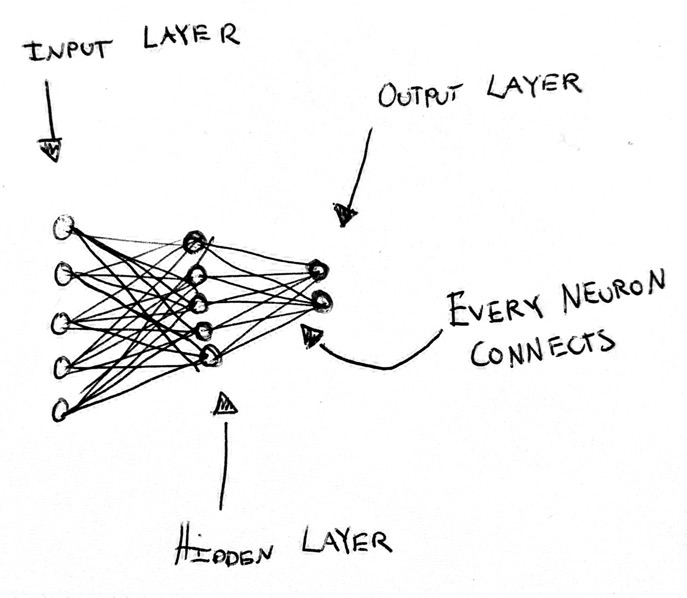
* **Input layer**. This is a representation of the data that we want to feed to
the neural net. For example, the input layer for a 4x4 pixel grayscale image
that looks like this could be `[1, 1, 1,
0.2]`. Meaning the first 3 pixels are darkest (1.0) and the last pixel is
lighter (0.2).
* **Hidden Layer**. This is the layer that does a bunch of math on the input
layer to convert it to our prediction. _Training_ a model refers to changing the
math of the hidden layer(s) to more often create an output like the training
data. We will go into more detail with this layer in a moment. The values in the
hidden layer are called *weights*.
* **Output Layer**. This layer will contain our final prediction. For example,
if we feed it the rectangle from before we
might want the output layer to be a single number to represent how "dark" a
rectangle is, e.g.: `0.8`.
For example for the image we'd expect a value close to 1 (dark!).
In contrast, for we
expect something closer to 0 than to 1.
Let's implement a neural network from our simple mental model. The goal of this
neural network is to take a grayscale 2x2 image and tell us how "dark" it is
where 0 is completely white , and 1 is
completely black . We will initialize the
hidden layer with some random values at first, in Python:
```python
input_layer = [0.2, 0.5, 0.4, 0.7]
# We randomly initialize the weights (values) for the hidden layer... We will
# need to "train" to make these weights give us the output layers we desire. We
# will cover that shortly!
hidden_layer = [0.98, 0.4, 0.86, -0.08]
output_neuron = 0
# This is really matrix multiplication. We explicitly _do not_ use a
# matrix/tensor, because they add overhead to understanding what happens here
# unless you work with them every day--which you probably don't. More on using
# matrices later.
for index, input_neuron in enumerate(input_layer):
output_neuron += input_neuron * hidden_layer[index]
print(output_neuron)
# => 0.68
```
Our neural network is giving us which is closer to 'dark' (1.0) than 'light' (0.0). When looking
at this rectangle as a human, we judge it to be more bright than dark, so we
were expecting something below 0.5!
There's a notebook with the final code available. You can make a copy and execute it there. For early versions of the code, such as the above, you can create a new cell at the beginning of the notebook and build up from there!
The only real thing we can change in our neural network in its current form is
the hidden layer's values. How do we change the hidden layer values so that the
output neuron is close to 1 when the rectangle is dark, and close to 0 when it's
light?
We could abandon this approach and just take the average of all the pixels. That
would work well! However, that's not really the point of a neural net... We'll
hit an impasse if we one day expand our model to try to implement
`recognize_letters_from_picture(img)` or `is_cat(img)`.
Fundamentally, a neural network is just a way to approximate any function. It's
really hard to sit down and write `is_cat`, but the same technique we're using
to implement `average` through a neural network can be used to implement
`is_cat`. This is called the [universal approximation theorem][uat]: an
artificial neural network can approximate _any_ function!
So, let's try to teach our simple neural network to take the `average()` of the
pixels instead of explicitly telling it that that's what we want! The idea of
this walkthrough example is to understand a neural net with very few values and
low complexity, otherwise it's difficult to develop an intuition when we move to
1,000s of values and 10s of layers, as real neural networks have.
We can observe that if we _manually modify_ all the hidden layer attributes to
`0.25`, our neural network is actually an average function!
```python
input_layer = [0.2, 0.5, 0.4, 0.7]
hidden_layer = [0.25, 0.25, 0.25, 0.25]
output_neuron = 0
for index, input_neuron in enumerate(input_layer):
output_neuron += input_neuron * hidden_layer[index]
# Two simple ways of calculating the same thing!
#
# 0.2 * 0.25 + 0.5 * 0.25 + 0.4 * 0.25 + 0.7 * 25 = 0.45
print(output_neuron)
# Here, we divide by 4 to get the average instead of
# multiplying each element.
#
# (0.2 + 0.5 + 0.4 + 0.7) / 4 = 0.45
print(sum(input_layer) / 4)
```
sounds about right. The
rectangle is a little lighter than it's dark.
But that was cheating! We only showed that we _can_ implement `average()` by
simply changing the hidden layer's values. But that won't work if we try to implement
something more complicated. Let's go back to our original hidden layer
initialized with random values:
```python
hidden_layer = [0.98, 0.4, 0.86, -0.08]
```
How can we _teach_ our neural network to implement `average`?
## Training our Neural Network
To teach our model, we need to create some training data. We'll create some
rectangles and calculate their average:
```python
rectangles = []
rectangle_average = []
for i in range(0, 1000):
# Generate a 2x2 rectangle [0.1, 0.8, 0.6, 1.0]
rectangle = [round(random.random(), 1),
round(random.random(), 1),
round(random.random(), 1),
round(random.random(), 1)]
rectangles.append(rectangle)
# Take the _actual_ average for our training dataset!
rectangle_average.append(sum(rectangle) / 4)
```
Brilliant, so we can now feed these to our little neural network and get a
result! Next step is for our neural network to adjust the values in the hidden
layer based on how its output compares with the actual average in the training
data. This is called our `loss` function: large loss, very wrong model; small
loss, less wrong model. We can use a standard measure called [_mean squared
error_][mse]:
```python
# Take the average of all the differences squared!
# This calculates how "wrong" our predictions are.
# This is called our "loss".
def mean_squared_error(actual, expected):
error_sum = 0
for a, b in zip(actual, expected):
error_sum += (a - b) ** 2
return error_sum / len(actual)
print(mean_squared_error([1.], [2.]))
# => 1.0
print(mean_squared_error([1.], [3.]))
# => 4.0
```
Now we can implement `train()`:
```python
def model(rectangle, hidden_layer):
output_neuron = 0.
for index, input_neuron in enumerate(rectangle):
output_neuron += input_neuron * hidden_layer[index]
return output_neuron
def train(rectangles, hidden_layer):
outputs = []
for rectangle in rectangles:
output = model(rectangle, hidden_layer)
outputs.append(output)
return outputs
hidden_layer = [0.98, 0.4, 0.86, -0.08]
outputs = train(rectangles, hidden_layer)
print(outputs[0:10])
# [1.472, 0.7, 1.369, 0.8879, 1.392, 1.244, 0.644, 1.1179, 0.474, 1.54]
print(rectangle_average[0:10])
# [0.575, 0.45, 0.549, 0.35, 0.525, 0.475, 0.425, 0.65, 0.4, 0.575]
mean_squared_error(outputs, rectangle_average)
# 0.4218
```
A good mean squared error is close to 0. Our model isn't very good. But! We've
got the skeleton of a feedback loop in place for updating the hidden layer.
### Updating the Hidden Layer with Gradient Descent
Now what we need is a way to update the hidden layer in response to the mean
squared error / loss. We need to _minimize_ the value of this function:
```python
mean_squared_error(
train(rectangles, hidden_layer),
rectangle_average
)
```
As noted earlier, the only thing we can really change here are the weights in
the hidden layer. How can we possibly know which weights will minimize this
function?
We could randomize the weights, calculate the loss (how wrong the model is,
in our case, with mean squared error), and then save the best ones we see after
some period of time.
We could possibly speed this up. If we have good weights, we could try to add
some random numbers to those. See if loss improves. This could work, but it
sounds slow... and likely to get stuck in some local maxima and not give a very
good result. And it's trouble scaling this to 1,000s of weights...
Instead of embarking on this ad-hoc randomization mess, it turns out that
there's a method called *gradient descent* to minimize the value of a function!
Gradient descent builds on a bit of calculus that you may not have touched on
since high school. We won't go into depth here, but try to introduce _just_
enough that you understand the concept. [^3blue1brown]
Let's try to understand gradient descent. Consider some random function whose
graph might look like this:
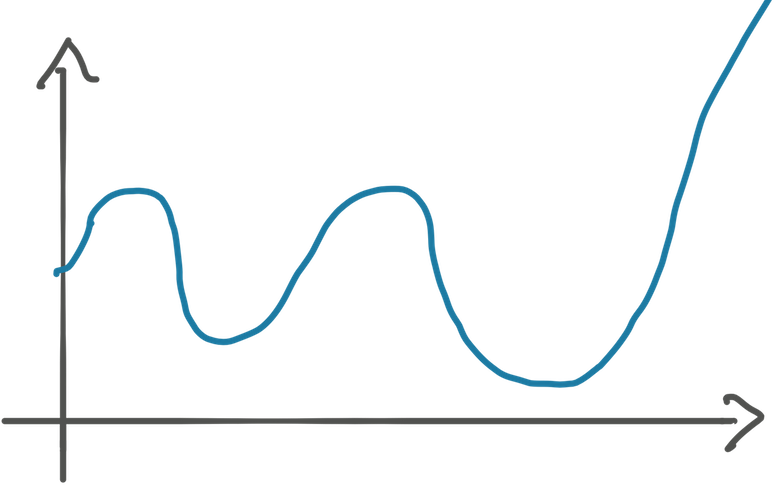
How do we write code to find the minimum, the deepest (second) valley, of this function?
Let's say that we're at `x=1` and we know the _slope_ of the function at this
point. The slope is "how fast the function grows at this very point." You may
remember this as _the derivative_. The slope at `x=1` might be `-1.5`. This
means that every time we increase `x += 1`, it results in `y -= 1.5`. We'll go
into how you figure out the slope in a bit, let's focus on the concept first.
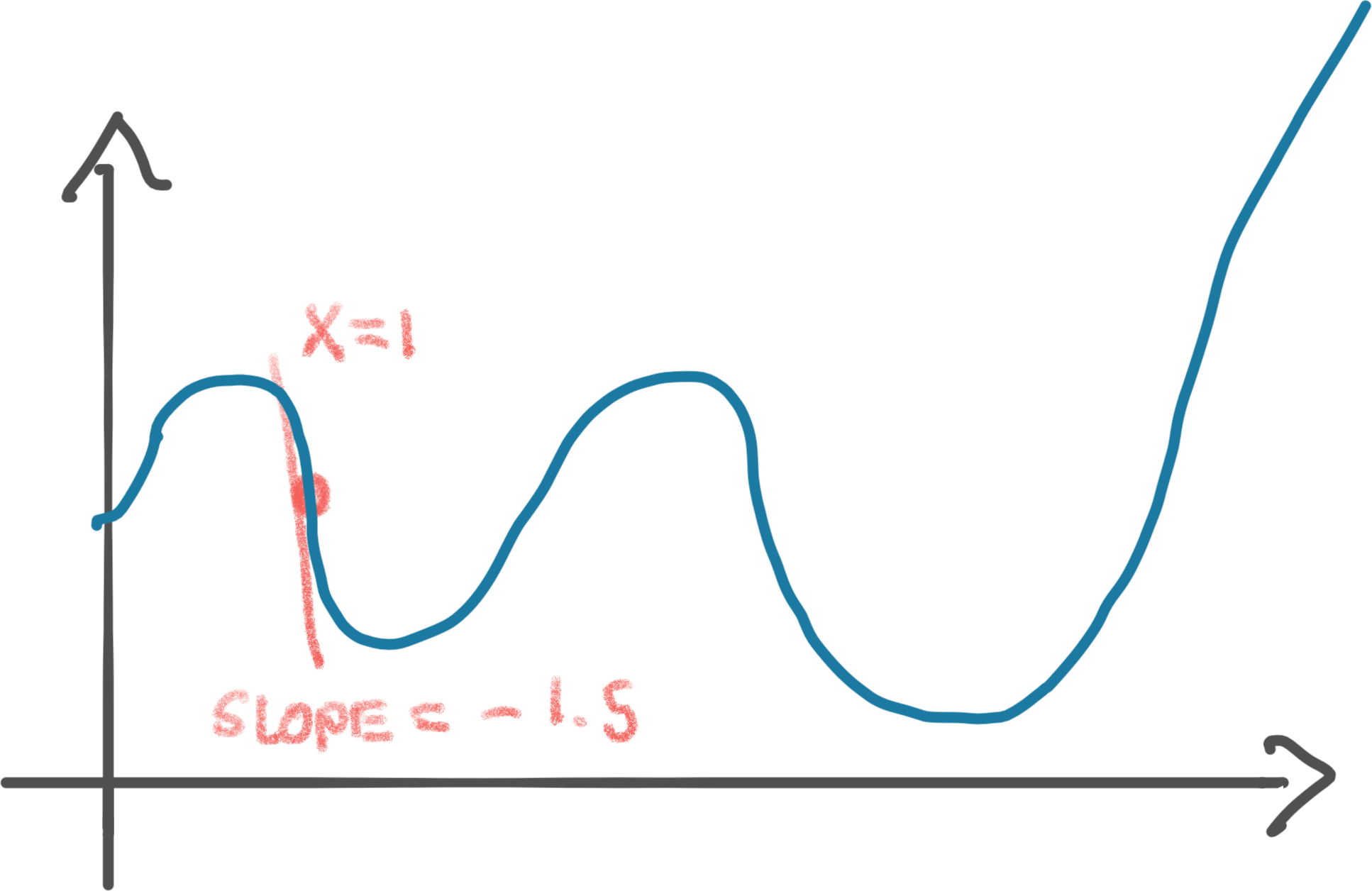
The idea of gradient descent is that since we know the value of our function,
`y`, is decreasing as we increase `x`, we can increase `x` proportionally to the
slope. In other words, if we increase `x` by the slope, we step towards the
valley by `1.5`.
Let's take that step of `x += 1.5`:
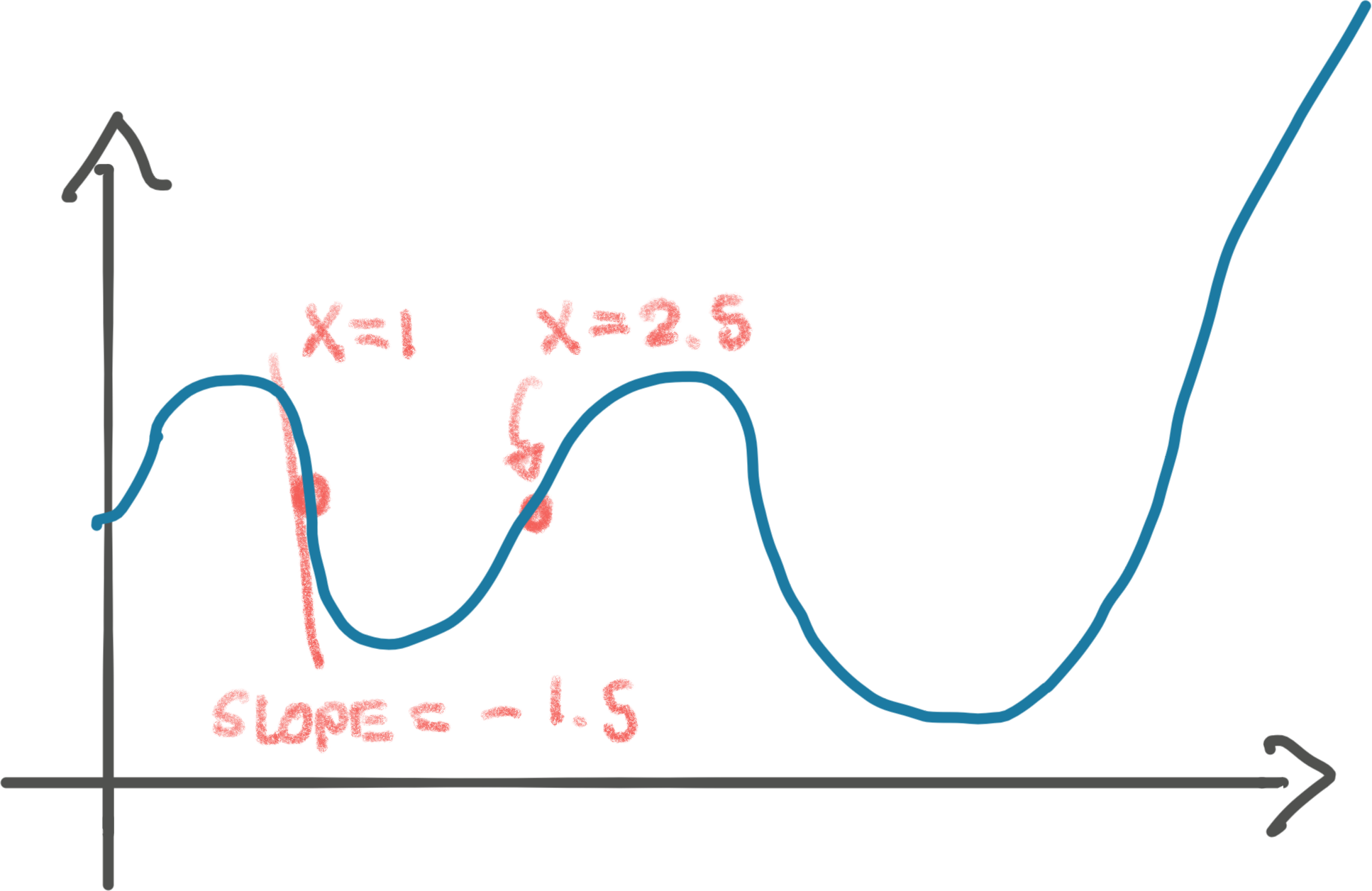
Ugh, turned out that we stepped _too_ far, past this valley! If we repeat the
step, we'll land somewhere on the left side of the valley, to then bounce back
on the right side. We might _never_ land in the bottom of the valley. Bummer.
Either way, this isn't the _global minimum_ of the function. We return to that
in a moment!
We can fix the overstepping easily by taking smaller steps. Perhaps we should've
stepped by just $0.1 * 1.5 = 0.15$ instead. That would've smoothly landed us at
the bottom of the valley. That multiplier, `0.1`, is called the _learning rate_
in gradient descent.
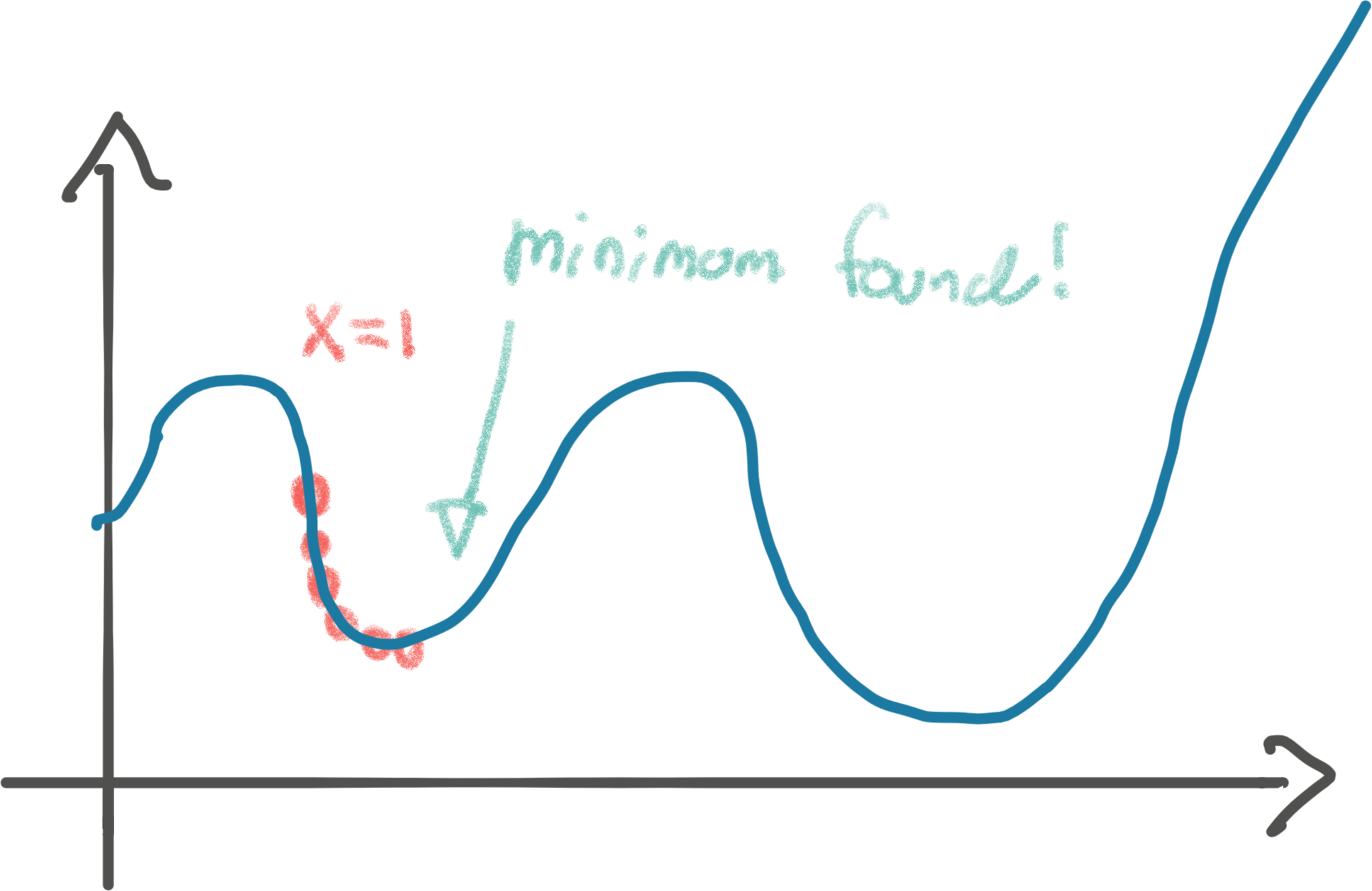
But hang on, that's not actually the minimum of the function. See that valley to
the right? That's the _actual_ global minimum. If our initial `x` value had been
e.g. 3, we might have found the global minimum instead of our local minimum.
Finding the global minimum of a function is _hard_. Gradient descent will give
us _a minimum_, but not _the minimum_. Unfortunately, it turns out it's the best
weapon we have at our disposal. Especially when we have big, complicated
functions (like a neural net with millions of neurons). Gradient descent will
not always find the global minimum, but something _pretty_ good.
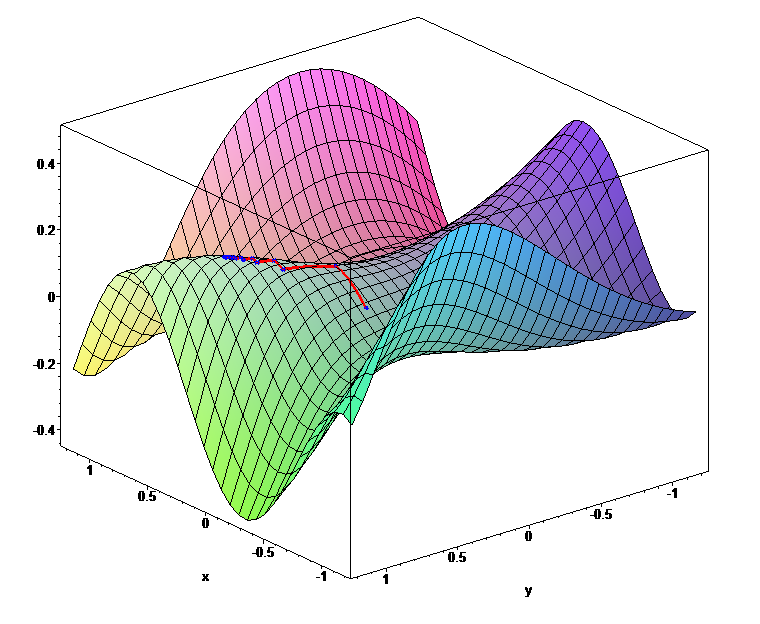
This method of using the slope/derivative generalizes. For example, consider
optimizing a function in three-dimensions. We can visualize the gradient descent
method here as _rolling a ball to the lowest point._ A big neural network is
1000s of dimensions, but gradient descent still works to minimize the loss!
## Finalizing our Neural Network from scratch
Let's summarize where we are:
* We can implement a simple neural net: `model()`.
* Our neural net can figure out how _wrong_ it is for a training set: `loss(train())`.
* We have a method, _gradient descent_, for tuning our hidden layer's weights
for the minimum loss. I.e. we have a method to adjust those four random values
in our hidden layer to take a _better_ average as we iterate through the
training data.
Now, let's implement gradient descent and see if we can make our neural net
learn to take the average grayscale of our small rectangles:
```python
def model(rectangle, hidden_layer):
output_neuron = 0.
for index, input_neuron in enumerate(rectangle):
output_neuron += input_neuron * hidden_layer[index]
return output_neuron
def train(rectangles, hidden_layer):
outputs = []
for rectangle in rectangles:
output = model(rectangle, hidden_layer)
outputs.append(output)
mean_squared_error(outputs, rectangle_average)
# We go through all the weights in the hidden layer. These correspond to all
# the weights of the function we're trying to minimize the value of: our
# model, respective of its loss (how wrong it is).
#
# For each of the weights, we want to increase/decrease it based on the slope.
# Exactly like we showed in the one-weight example above with just x. Now
# we just have 4 values instead of 1! Big models have billions.
for index, _ in enumerate(hidden_layer):
learning_rate = 0.1
# But... how do we get the slope/derivative?!
hidden_layer[index] -= learning_rate * hidden_layer[index].slope
return outputs
hidden_layer = [0.98, 0.4, 0.86, -0.08]
train(rectangles, hidden_layer)
```
### Automagically computing the slope of a function with `autograd`
The missing piece here is to figure out the `slope()` after we've gone through
our training set. Figuring out the slope/derivative at a certain point is
tricky. It involves a fair bit of math. I am not going to go into the math of
calculating derivatives. Instead, we'll do what all the machine learning
libraries do: automatically calculate it. [^nielsen]
Minimizing the loss of a function is absolutely fundamental to machine learning.
The functions (neural networks) are _so_ complicated that manually sitting down
to figure out the derivative like you might've done in high school is not
feasible. It's the mathematical equivalent of writing assembly to implement a
website.
Let's show one simple example of finding the derivative of a function, before we
let the computers do it all for us. If we have $f(x) = x^2$, then you might
remember from calculus classes that the derivative is $f'(x) = 2x$. In other
words, $f(x)$'s slope at any point is `2x`, telling us it's increasing
non-linearly. Well that's exactly how we understand $x^2$, perfect! This means
that for $x = 2$ the slope is $4$.
With the basics in order, we can use an `autograd` package to avoid the messy
business of computing our own derivatives. `autograd` is an _automatic
differentiation engine_. _grad_ stands for _gradient_, which we can think of as the
derivative/slope of a function with more than one parameter.
It's best to show how it works by using our example from before:
```python
import torch
# A tensor is a matrix in PyTorch. It is the fundamental data-structure of neural
# networks. Here we say PyTorch, please keep track of the gradient/derivative
# as I do all kinds of things to the parameter(s) of this tensor.
x = torch.tensor(2., requires_grad=True)
# At this point we're applying our function f(x) = x^2.
y = x ** 2
# This tells `autograd` to compute the derivative values for all the parameters
# involved. Backward is neural network jargon for this operation, which we'll
# explain momentarily.
y.backward()
# And show us the lovely gradient/derivative, which is 4! Sick.
print(x.grad)
# => 4
```
`autograd` is the closest to magic we get. I could do the most ridiculous stuff
with this tensor, and it'll keep track of all the math operations applied and
have the ability to compute the derivative. We won't go into how. Partly because
I don't know how, and this post is long enough.
Just to convince you of this, we can be a little cheeky and do a bunch of random
stuff. I'm trying to really hammer this home, because this is what confused me
the most when learning about neural networks. It wasn't obvious to me that a
neural network, including executing the loss function on the whole training set,
is _just_ a function, and however complicated, we can still take the derivative
of it and use gradient descent. Even if it's so many dimensions that it can't be
neatly visualized as a ball rolling down a hill.
`autograd` doesn't complain as we add complexity and will still calculate the
gradients. In this example we'll even use a matrix/tensor with a few more elements and
calculate an average (like our loss function `mean_squared_error`), which is the
kind of thing we'll calculate the gradients for in our neural network:
```python
import random
import torch
x = torch.tensor([0.2, 0.3, 0.8, 0.1], requires_grad=True)
y = x
for _ in range(3):
choice = random.randint(0, 2)
if choice == 0:
y = y ** random.randint(1, 10)
elif choice == 1:
y = y.sqrt()
elif choice == 2:
y = y.atanh()
y = y.mean()
# This walks "backwards" y all the way to the parameters to
# calculate the derivates / gradient! Pytorch keeps track of a graph of all the
# operations.
y.backward()
# And here are how quickly the function is changing with respect to these
# parameters for our randomized function.
print(x.grad)
# => tensor([0.0157, 0.0431, 0.6338, 0.0028])
```
Let's use `autograd` for our neural net and then run it against our square from
earlier :
```python
import torch as torch
def model(rectangle, hidden_layer):
output_neuron = 0.
for index, input_neuron in enumerate(rectangle):
output_neuron += input_neuron * hidden_layer[index]
return output_neuron
def train(rectangles, hidden_layer):
outputs = []
for rectangle in rectangles:
output = model(rectangle, hidden_layer)
outputs.append(output)
# How wrong were we? Our 'loss.'
error = mean_squared_error(outputs, rectangle_average)
# Calculate the gradient (the derivate for all our weights!)
# This walks "backwards" from the error all the way to the weights to
# calculate them
error.backward()
# Now let's go update the weights in our hidden layer per our gradient.
# This is what we discussed before: we want to find the valley of this
# four-dimensional space/four-weight function. This is gradient descent!
for index, _ in enumerate(hidden_layer):
learning_rate = 0.1
# hidden_layer.grad is something like [0.7070, 0.6009, 0.6840, 0.5302]
hidden_layer.data[index] -= learning_rate * hidden_layer.grad.data[index]
# We have to tell `autograd` that we've just finished an epoch to reset.
# Otherwise it'd calculate the derivative from multiple epochs.
hidden_layer.grad.zero_()
return error
# We use tensors now, but we just use them as if they were normal lists.
# We only use them so we can get the gradients.
hidden_layer = torch.tensor([0.98, 0.4, 0.86, -0.08], requires_grad=True)
print(model([0.2,0.5,0.4,0.7], hidden_layer))
# => 0.6840000152587891
train(rectangles, hidden_layer)
# The hidden layer's weights are nudging closer to [0.25, 0.25, 0.25, 0.25]!
# They are now [ 0.9093, 0.3399, 0.7916, -0.1330]
print(f"After: {model([0.2,0.5,0.4,0.7], hidden_layer)}")
# => 0.5753424167633057
# The average of this rectangle is 0.45, closer... but not there yet
```
This blew my mind the first time I did this. Look at that. It's optimizing the
hidden layer for all weights in the right direction! We're expecting them all
to nudge towards $0.25$ to implement `average()`. We haven't told it _anything_
about average, we've just told it how wrong it is through the loss.
It's important to understand how hidden_layer.grad is set here. The
hidden layer is instantiated as a tensor with an argument telling Pytorch to
keep track of all operations made to it. This allows us to later call backward() on a future tensor that derives from the hidden layer,
in this case, the error tensor, which is further derived from the
outputs tensor. You can read more in the documentation
_But_, the hidden layer isn't all $0.25$ quite yet, as we expect for it to
implement `average`. So how do we get them to that? Well, let's try to repeat
the gradient descent process 100 times and see if we're getting even better!
```python
# An epoch is a training pass over the full data set!
for epoch in range(100):
error = train(rectangles, hidden_layer)
print(f"Epoch: {epoch}, Error: {error}, Layer: {hidden_layer.data}\n\n")
#
# Epoch: 99, Error: 0.0019292341312393546, Layer: tensor([0.3251, 0.2291, 0.3075, 0.1395])
print(model([0.2,0.5,0.4,0.7], hidden_layer).item())
# => 0.4002
```
Pretty close, but not quite there. I ran it for $300$ times (an iteration over
the full training set is referred to as an epoch, so 300 epochs) instead, and
then I got:
```python
print(model([0.2,0.5,0.4,0.7], hidden_layer).item())
# Epoch: 299, Error: 1.8315197394258576e-06, Layer: tensor([0.2522, 0.2496, 0.2518, 0.2465])
# tensor(0.4485, grad_fn=)
```
Boom! Our neural net has _almost_ learned to take the average, off by just a
scanty $0.002$. If we fine-tuned the learning rate and number of epochs we could
probably get it there, but I'm happy with this. :
That's it. That's your first neural net:
$$
model(rectangle) \approx avg(rectangle)
$$
## OK, so you just implemented the most complicated `average` function I've ever seen...
Sure did. The thing is, that if we adjusted it for looking for cats, it's the
least complicated `is_cat` you'll ever see. Because our neural network could
implement that too by changing the training data. Remember, a neural network
with enough neurons can approximate _any function_. You've just learned all the
building blocks to do it. We just started with the simplest possible example.
If you give the hidden layer some more neurons, this neural net will be able to
recognize [handwritten numbers][mnist] with decent accuracy (possible fun
exercise for you, see bottom of article), like this one:

### Activation Functions
To be truly powerful, there is one paramount modification we have to make to our
neural net. Above, we were implementing the $average$ function. However, were
our neural net to implement `which_digit(png)` or `is_cat(jpg)` then it wouldn't work.
Recognizing handwritten digits isn't a _linear_ function, like `average()`. It's
non-linear. It's a crazy function, with a crazy shape (unlike a linear
function). To create crazy functions with crazy shapes, we have to introduce a
non-linear component to our neural network. This is called an _activation_
function. It can be e.g. $ReLu(x) = max(0, x)$. There are many kinds of
[activation functions][activation] that are good for different things.
[^activation]
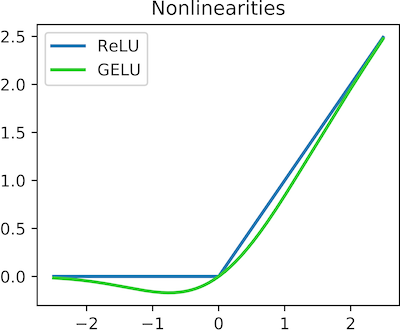
We can apply this simple operation to our neural net:
```python
def model(rectangle, hidden_layer):
output_neuron = 0.
for index, input_neuron in enumerate(rectangle):
output_neuron += input_neuron * hidden_layer[index]
return max(0, output_neuron)
```
Now, we only have a single neuron/weight... that isn't much. Good models have
100s, and the biggest models like GPT-3 have billions. So this won't recognize
many digits or cats, but you can easily add more weights!
### Matrices
The core operation in our model, the for loop, is matrix multiplication. We could
rewrite it to use them instead, e.g. `rectangle @ hidden_layer`. PyTorch will
then do the exact same thing. Except, it'll now execute in C-land. And if you
have a GPU and pass some extra weights, it'll execute on a GPU, which is even
faster. When doing any kind of deep learning, you want to avoid writing any
Python loops. They're just too slow. If you ran the code above for the 300
epochs, you'll see that it takes minutes to complete. I left matrices out of it
to simplify the explanation as much as possible. There's plenty going on without
them.
## Next steps to implement your own neural net from scratch
Even if you've carefully read through this article, you won't fully grasp it
yet until you've had your own hands on it. Here are some suggestions on where to
go from here, if you'd like to move beyond the basic understanding you have now:
1. Get the [notebook][notebook] running and study the code
2. Change it to far larger rectangles, e.g. 100x100
2. Add biases in addition to the weights. A model doesn't just have
weights that are multiplied onto the inputs, but also biases that are added
(`+`) onto the inputs in each layer.
3. Rewrite the model to use [PyTorch tensors][pytorch] for matrix operations, as
described in the previous section.
4. Add 1-2 more layers to the model. Try to have them have different sizes.
5. Change the tensors to run on GPU (see the [PyTorch
documentation][pytorch-cuda]) and see the
performance speed up! Increase the size of the training set and rectangles to
_really_ be able to tell the difference. Make sure you change `Runtime >
Change Runtime Type` in Collab to run on a GPU.
6. This is a difficult step that will likely take a while, but it'll be well
worth it: Adapt the code to recognize handwritten letters from the [MNIST
dataset][mnist-png] dataset. You'll need to use [`pillow`][pillow] to turn
the pixels into a large 1-dimensional tensor as the input layer, as well as a
non-linear activation function like `Sigmoid` or `ReLU`. Use [Nielsen's
book][nielsen] as a reference if you get stuck, which does exactly this.
I thoroughly hope you enjoyed this walkthrough of a neural net from scratch! In
a future issue we'll use the mental model we've built up here to do some napkin
math on expected performance on training and using neural nets.
_Thanks to [Vegard Stikbakke][vegard], [Andrew Bugera][bugera] and [Jonathan
Belotti][belotti] for providing valuable feedback on drafts of this article._
[^google]: This is a good example of Peak Complexity.
The existing phrase-based translation model was iteratively improved with
increasing complexity, distributed systems to look up five-word phrases
frequencies, etc. The complexity required to improve the model 1% was becoming
astronomical. A good hint you need a paradigm shift to reset the complexity.
Deep Learning provided that complexity reset for the translation model.
[^gpt3]: GPT-3 has ~175 billion weights. The human brain has ~86 billion. Of
course, you cannot technically compare an artificial neuron to a real one.
Why? I don't know. I reserve that it remains an interesting question. [It's
estimated][gpt3cost] that it cost in the double-digit millions to train it.
[^3blue1brown]: There's a brilliant [Youtube series][3blue1brown] that'll go
into more depth on the math than I do in this article. This article
accompanies the video nicely, as the video doesn't go into the implementation.
[^nielsen]: There's a great, [short e-book][nielsen] on implementing a neural
network from scratch available that goes into far more detail on computing the
derivative from scratch. Despite this existing, I still decided to do this
write-up because calculating the slope manually takes up a lot of time and
complexity. I wanted to teach it from scratch without going into those
details.
[^activation]: I found this pretty strange when I learned about neural networks.
We can use a bunch of random non-linear function and our neural network
works... better? The answer is yes! The complicated answer I am not
knowledgeable enough to offer... If you write your own handwritten MNIST
neural net (as suggested at the end of the article), you can see for yourself
by adding/removing a non-linear function and looking at the loss.
[deanint]: https://www.listennotes.com/podcasts/the-twiml-ai/systems-and-software-for-xolUkM23Gb0/
[mnist]: http://yann.lecun.com/exdb/mnist/
[activation]: https://en.wikipedia.org/wiki/Activation_function
[gpt3cost]: https://lastweekin.ai/p/gpt-3-is-no-longer-the-only-game
[3blue1brown]: https://www.youtube.com/watch?v=aircAruvnKk
[nielsen]: http://neuralnetworksanddeeplearning.com/
[paperspace]: https://www.paperspace.com/
[collab]: https://colab.research.google.com/?utm_source=scs-index
[pytorch]: https://pytorch.org/docs/stable/tensors.html
[mnist-png]: https://s3.amazonaws.com/fast-ai-imageclas/mnist_png.tgz
[pillow]: https://pillow.readthedocs.io/en/stable/
[uat]: https://en.wikipedia.org/wiki/Universal_approximation_theorem
[vegard]: https://www.vegardstikbakke.com/
[belotti]: https://thundergolfer.com/
[bugera]: https://www.flyingcroissant.ca/
[mse]: https://en.wikipedia.org/wiki/Mean_squared_error
[notebook]: https://colab.research.google.com/drive/1YRp9k_ORH4wZMqXLNkc3Ir5w4B5f-8Pa?usp=sharing
[pytorch-cuda]: https://pytorch.org/docs/stable/notes/cuda.html
[autograd]: https://pytorch.org/docs/1.9.1/generated/torch.Tensor.backward.html